
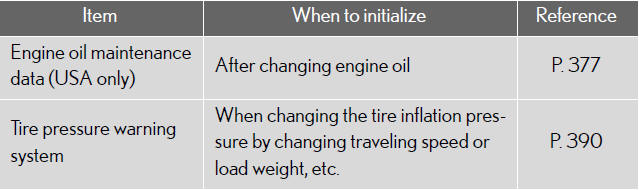
Items to initialize
After reconnecting or performing maintenance on the battery, the following items must be initialized for normal system operation.
See also:
Hill-start assist control
Hill-start assist control helps to prevent the vehicle from rolling
backwards
when starting on an incline or slippery slope.
To engage hill-start assist control,
further depress the brake
peda ...
Active Safety
The new Lexus CT 200h may be equipped with a sophisticated Pre-Crash Safety
system (PCS) that can help reduce collision damage and injury. It employs a
millimetre wave radar sensor to detect objec ...
Automatic High Beam
The Automatic High Beam uses an in-vehicle camera sensor to assess the
brightness of streetlights, the lights of oncoming and preceding vehicles,
etc., and automatically turns high beam on or off as ...