
Rear sunshade
The rear sunshade can be raised and lowered by operating the switch shown below.
 Type A
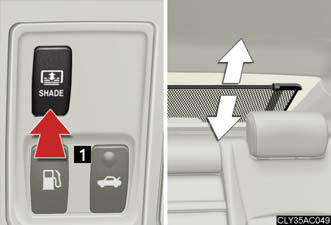
1. Raise/lower
Type B
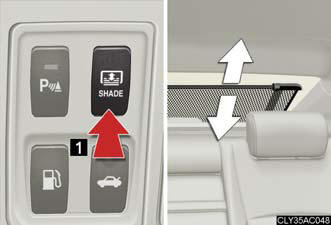
1. Raise/lower
The rear sunshade can be used when
The “ENGINE START STOP” switch is in IGNITION ON mode.
Reverse operation feature
The rear sunshade automatically lowers when the shift lever is shifted into
R. The
rear sunshade rises when the shift lever is shifted out of R and vehicle speed
reaches 9 mph (15 km/h).
When the reverse operation feature does not operate
The rear sunshade may not lower or rise automatically. In this case, press
the switch
to lower or raise the rear sunshade.
CAUTION:
When the rear sunshade is being raised or lowered
Do not place fingers or other objects in the fastener section or in the opening.
They may get caught, causing injury.
NOTICE:
To prevent the battery from being discharged
Do not operate the rear sunshade when the engine is not running.
To ensure normal operation of the sunshade Observe the following precautions.
- Do not place excessive load on the motor or other components.
- Do not place objects where they may hinder opening and closing operations.
- Do not attach items to the rear sunshade.
- Keep the opening clean and clear of obstructions.
- Do not operate the rear sunshade continuously over long periods of time.
See also:
Cigarette lighter
Push the back part of the lid to
open, and push the cigarette
lighter down.
The cigarette lighter will pop up
when it is ready for use.
The cigarette lighter can be used when
The “ENGINE START ...
Using the AUX adapter
This adapter can be used to connect a portable audio device and listen to
it
through the vehicle’s speakers.
Slide the armrest while pulling
up the lever, and lift the armrest.
Remove the uppe ...
Armrest
Pull the armrest down for use.
NOTICE:
To prevent damage to the armrest
Do not place too much strain on the armrest. ...