
Clock
 Without navigation system
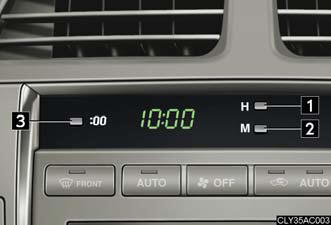
1. Adjusts the hour.
2. Adjusts the minutes.
3. Rounds to the nearest hour.* *: e.g. 1:00 to 1:29 → 1:00 1:30 to 1:59 → 2:00
With navigation system
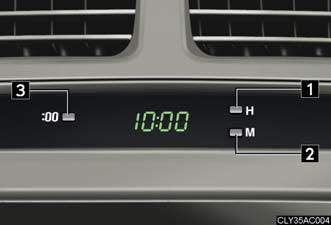
1. Adjusts the hour.
2. Adjusts the minutes.
3. Rounds to the nearest hour.* *: e.g. 1:00 to 1:29 → 1:00 1:30 to 1:59 → 2:00
The clock is displayed when
The “ENGINE START STOP” switch is in ACCESSORY or IGNITION ON mode.
See also:
Steering wheel
The steering wheel can be adjusted to a comfortable position while the
“ENGINE START STOP” switch is in ACCESSORY or IGNITION ON
mode.
1. Up.
2. Down.
3. Away from the driver.
4. Toward the dr ...
2011 Lexus CT 200h review By Kelsey Mays
Americans love hybrid hatchbacks, but mostly for the hybrid part; overall,
we're still lukewarm on traditional hatchbacks. Lexus added a third ingredient —
budget luxury — to create the CT 200h. W ...
Chassis/Body/Suspension/Tires/Brakes
The Lexus ES 350 owes its smooth, quiet ride in large part to a rigid unibody
structure that allows the four-wheel independent suspension to be tuned to
provide responsive handling agility and ult ...