
Using the AUX adapter
This adapter can be used to connect a portable audio device and listen to
it
through the vehicle’s speakers.
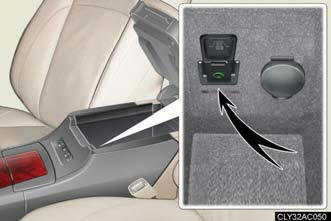
Connect the portable audio device.
Press  .
.
Operating portable audio devices connected to the audio system
The volume can be adjusted using the vehicle's audio controls. All other
adjustments
must be made on the portable audio device itself.
When using a portable audio device connected to the power outlet
Noise may occur during playback. Use the power source of the portable audio device.
See also:
Current Lexus LS 460
The Lexus LS 460 is a full-size luxury sedan available in regular 460 and
extended-wheelbase 460 L body styles. Most of the features you'd expect in this
upper echelon of automobiles can be found ...
Fuel information
Your vehicle must use only unleaded gasoline.
Premium unleaded gasoline with an octane rating of 91 (Research Octane
Number 96) or higher required for optimum engine performance. If 91
octane canno ...
Coat hooks
Pull out the hooks to hang coats or other soft items.
CAUTION:
Items that must not be hung on the hook
Do not hang a coat hanger or other hard or sharp object on the hook. If the SRS
curtain shi ...