
Using the AUX adapter
This adapter can be used to connect a portable audio device and listen to
it
through the vehicle’s speakers.
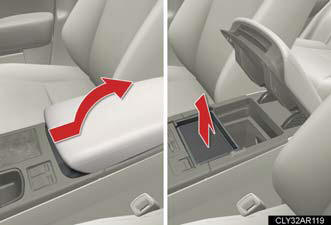
Slide the armrest while pulling up the lever, and lift the armrest.
Remove the upper tray.
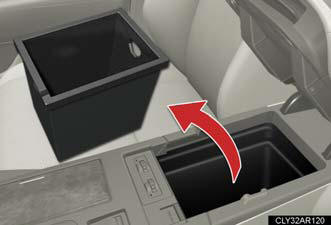
Remove the lower tray.
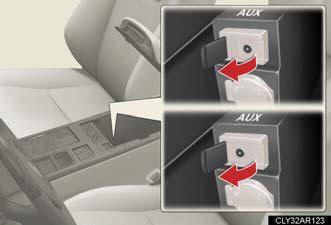
Open the cover and connect the portable audio device.
Press  or
or
 .
.
Operating portable audio devices connected to the audio system
The volume can be adjusted using the vehicle's audio controls. All other
adjustments
must be made on the portable audio device itself.
When using a portable audio device connected to the power outlet
Noise may occur during playback. Use the power source of the portable audio device.
See also:
Audio system
- Vehicles with a navigation system.
Owners of models equipped with a navigation system should refer to
the “Navigation System Owner’s Manual”.
- Vehicles without a navigation system (type A).
CD ...
Other Cars to Consider
While the Lexus IS is the sportier of the two midsize cars Lexus makes,if
you’re looking for a car that will eat up windy roads, there are better options
out there. The BMW 3-Series gives buyers s ...
Drive Mode Select Switch
Supplementing the NORMAL drive mode of new Lexus, three 'ondemand' drive
modes may be selected via the Drive Mode Select switch, adapting the Lexus CT
200h to either a Dynamic or Relaxing driving ...