
Air conditioning filter
The air conditioning filter must be cleaned or changed regularly to
maintain
air conditioning efficiency.
Replacement method
1. Turn the “ENGINE START STOP” switch OFF.
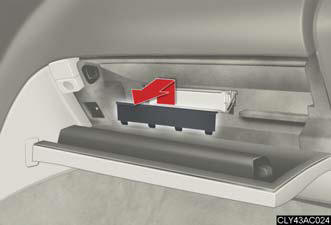
2. Open the glove box. Remove the glove box cover.
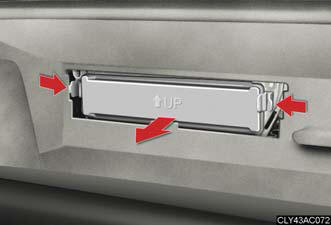
3. Remove the filter cover.
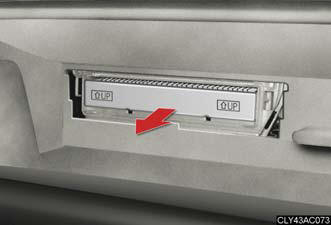
4. Remove the filter.
Be sure that the correct side of the filter faces up when installing it.
Cleaning method
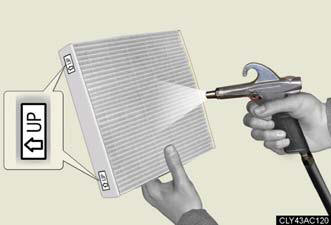
If the filter is dirty, clean by blowing compressed air through the filter from the downward side.
Hold the air gun 2 in. (5 cm) from the filter and blow for approximately 2 minutes at 72 psi (500 kPa, 5.0 kgf/cm2 or bar).
If it is not available, have the filter cleaned by your Lexus dealer.
Checking interval
Inspect, clean and replace the air conditioning filter according to the
maintenance
schedule. In dusty areas or areas with heavy traffic flow, more frequent
cleaning or
early replacement may be required. (For scheduled maintenance information,
please refer to the “Warranty and Services Guide/Owner's Manual Supplement/
Scheduled Maintenance”.)
If air flow from the vents decreases dramatically
The filter may be clogged. Check the filter and replace if necessary.
NOTICE:
To prevent damage to the system
- When using the air conditioning system, make sure that a filter is always
installed.
- When cleaning the filter, do not clean the filter with water.
See also:
Exterior
There's no argument that the GX 470 is a pretty SUV. This was a full-sized
mama with curves in all the right places. The GX was big without being bulky or
obnoxious, like some of the other huge SU ...
Driving assist systems
To help enhance driving safety and performance, the following systems
operate automatically in response to various driving situations. Be aware,
however, that these systems are supplementary and sho ...
Features
While the RX 450h is reasonably priced to start at $42,110, adding options
quickly ratchets up the sticker price. Items you might find standard on other
cars in this class, like those heated and c ...