
Clock
The clock is displayed when the “POWER” switch is in ACCESSORY or ON mode. Perform the following steps to adjust the clock.
- Without a navigation system
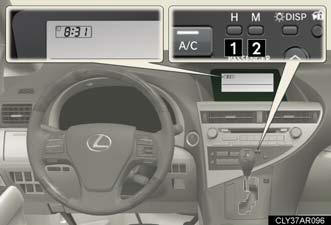
1. Adjusts the hours.
2. Adjusts the minutes.
- With a navigation system Refer to “Navigation System Owner’s Manual”.
The time display will automatically be set to 1:00.
See also:
Garage door opener
The garage door opener can be programmed to operate garage doors,
gates, entry doors, door locks, home lighting systems, security systems, and
other devices.
The garage door opener (HomeLink® Unive ...
Compass
The compass on the inside rear view mirror indicates the direction in
which
the vehicle is heading.
Operation
1. To turn the compass on or off,
push and hold “AUTO” for 3
seconds.
Displays a ...
Armrest
Pull the armrest down for use.
NOTICE:
To prevent damage to the armrest
Do not place too much strain on the armrest. ...