
Keys
The following keys are provided with the vehicle.
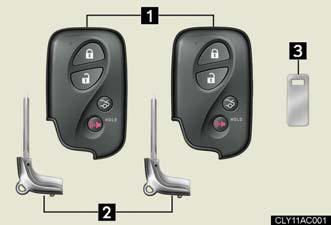
1. Electronic keys.
• Operating the smart access system with push-button start.
• Operating the wireless remote control function.
2. Mechanical keys
3. Key number plate
Using the mechanical key
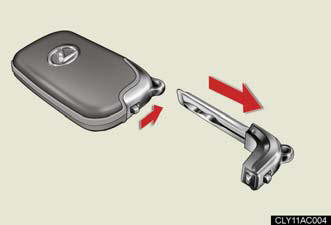
Take out the mechanical key.
After using the mechanical key, store it in the electronic key. Carry the mechanical key together with the electronic key. If the electronic key battery is depleted or the entry function does not operate properly, you will need the mechanical key.
When required to leave a key to the vehicle with a parking attendant
Turn the trunk opener main switch OFF and lock the glove box and the armrest door as circumstances demand.
Remove the mechanical key for your own use and provide the attendant with the electronic key only.
Key number plate
Keep the plate in a safe place such as your wallet, not in the vehicle. In
the event that
a mechanical key is lost, a new key can be made at your Lexus dealer using the
key
number plate.
When riding in an aircraft
When bringing an electronic key onto an aircraft, make sure you do not press
any
buttons on the electronic key while inside the aircraft cabin. If you are
carrying an
electronic key in your bag etc, ensure that the buttons are not likely to be
pressed
accidentally. Pressing a button may cause the electronic key to emit radio waves
that could interfere with the operation of the aircraft.
NOTICE:
To prevent key damage.
- Do not subject the keys to strong shocks, expose them to high temperatures by placing them in direct sunlight, or get them wet.
- Do not expose the keys to electromagnetic materials or attach any material
that
blocks electromagnetic waves to the key surface.
- Do not disassemble the electronic key.
See also:
Lexus Audio Systems with Bamboo Charcoal Speakers
The Lexus CT 200h builds on the legendary standards already established by
Lexus in the field of in-car high fidelity with a choice of three powerful audio
systems.
Fitted as standard, the entry ...
But does it go?
The ES 350′s V6 – shared with a handful of Toyota and Lexus products – has
become almost legendary for its refinement, if not its broad power range.
Silky-smooth at idle, its lack of intrusi ...
Ashtray
Push the back part of the lid to
open.
To remove, pull the ashtray
upwards.
CAUTION:
When not in use
Keep the ashtray closed.
Injuries may result in the event of sudden braking, sudden swervi ...