
Multi-display light control (vehicles without a navigation system)
The brightness of the multi-display can be adjusted to four levels.
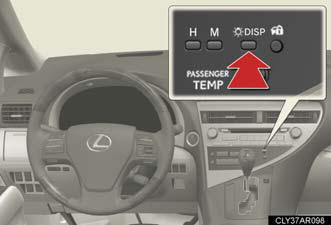
Press and release the “DISP” button until the brightness of the display is adjusted to the desired level.
Instrument panel linked brightness control
When the headlight switch is turned on, the brightness of the multi-display
will be
reduced in accordance with the brightness of the instrument panel.
See also:
Electronic key battery
Replace the battery with a new one if it is discharged.
You will need the following items:
Flathead screwdriver.
- Small Phillips-head screwdriver.
- Lithium battery (CR1632).
Replacing the batte ...
Thrust vs. Thrift
Thanks to the drivetrain's immediate thrust, the CT 200h has adequate oomph
for driving solo: It scoots from a stoplight well enough and maintains highway
speeds with little trouble. But it lacks ...
Using the phone book
To enter the menu for each function, follow the steps below using a
voice command or :
- Adding a new phone number
1. “Phonebook” → 2. “Add Entry”.
- Changing the registered name in the phon ...