
Operating a Bluetooth® enabled portable player
- Type A
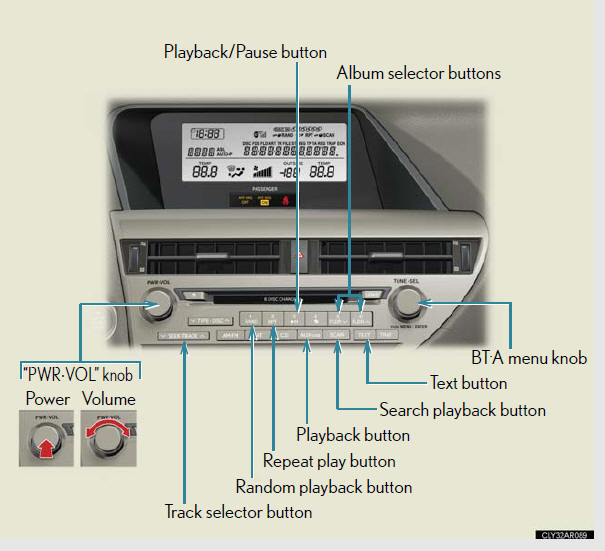
- Type B
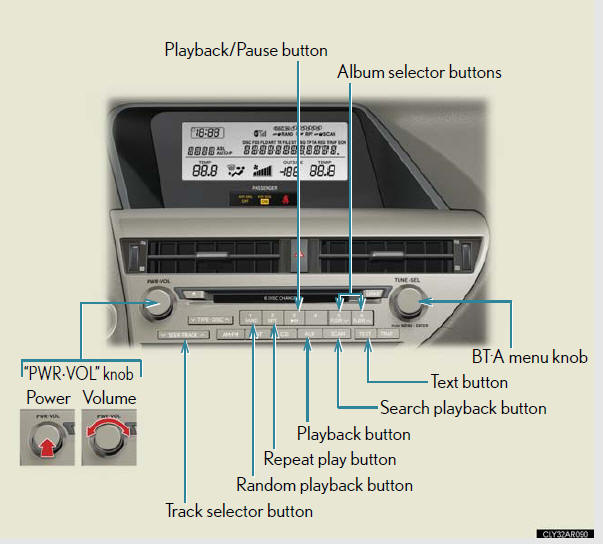
Selecting an album
To select the desired album, press
 or
or
 .
.
Selecting tracks
Press  or
or
 on
on
 to select the desired track.
Playing and pausing tracks
To play or pause a track, press  .
.
Fast-forwarding and rewinding tracks
To fast-forward or rewind, press and hold
or
on
until
you hear a beep.
Random playback
Press  .
.
To cancel, press  again.
Repeat play
Press  .
.
To cancel, press  again.
Scanning tracks
Press  .
.
To cancel, press  again.
Switching the display
Press  .
.
Each time the button is pressed, the display changes in the following order:
Elapsed time → Album title → Track title → Artist name
Bluetooth® audio system functions
Depending on the portable player that is connected to the system, certain
functions
may not be available.
Error messages
“Memory Error”: This indicates a problem in the system.
See also:
If your vehicle overheats
The following may indicate that your vehicle is overheating:
l “ENGINE OVERHEAT” is shown on the multi-information display:
The engine may be overheating.
“HYBRID SYSTEM OVERHEAT” is shown on the m ...
Dynamic radar cruise control
Dynamic radar cruise control supplements conventional cruise control with a vehicle-to-vehicle distance control. In the vehicle-to-vehicle distance control mode, the vehicle automatically accelerates ...
Moon roof
Use the overhead switches to open, close, and tilt the moon roof up and
down.
Opening and closing
Standard type
1. Open.
The moon roof stops slightly
before the fully opened position.
Push th ...