
Using the steering wheel audio switches
Some audio features can be controlled using the switches on the steering wheel.
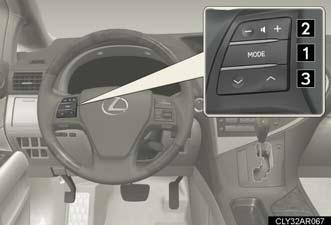
1. Turns the power on, selects an audio source.
2. Increases/decreases volume.
3. Radio mode: Selects a radio station.
CD mode: Selects a track,
file (MP3 and
WMA) and disc.
Bluetooth® audio mode
(type A and B):
Selects a track and
album.
iPod® player mode (type A): Selects a song.
USB memory player mode
(type A):
Selects a file and folder.
Turning the power on
Press  when the audio system is
turned off.
The audio system can be turned off by holding the switch down until you hear a beep.
Changing the audio source
Press when the audio system is
turned on. The audio source
changes as follows each time the button is pressed. If no discs are
inserted in the player, that mode will be skipped.
Type A:
FM1→FM2→SAT1→SAT2→SAT3→CD player→
Bluetooth® audio→AUX→iPod® or USB memory player→
AM→FM1.
Type B:
FM1→FM2→SAT1→SAT2→SAT3→CD player→
Bluetooth® audio→AUX→AM→FM1.
Type C:
FM1→FM2→CD player→AUX→AM→FM1.
Adjusting the volume
Press “+” on  to increase the
volume and “-” to decrease the volume.
Hold down the button to continue increasing or decreasing the volume.
Selecting a radio station
1. Press to select radio mode.
2. Press  or
or
 on
on
 to select a radio station.
To scan for receivable stations, press and hold
 or
or
 on the button
until you hear a beep.
Selecting a track/file or song
1. Press to select CD, Bluetooth®
audio, iPod® player or
USB memory player mode.
2. Press or
on
to select the desired track/file or
song.
Selecting an album
1. Press to select Bluetooth®
audio mode.
2. Press and hold or
on
until you hear a beep.
Selecting a folder
1. Press to select USB memory
player mode.
2. Press and hold or
on
until you hear a beep.
Selecting a disc in the CD player
1. Press to select CD mode.
2. Press and hold or
on
until you hear a beep.
Canceling automatic selection of a radio station
Press again.
CAUTION:
To reduce the risk of an accident
Exercise care when operating the audio switches on the steering wheel.
See also:
Optimal use of the audio system
- Type A and B
1. Displays the current mode.
2. Changes the following settings:
• Sound quality and volume
balance.
The sound quality and balance
setting can be changed to produce
the best so ...
If you think something is wrong
If you notice any of the following symptoms, your vehicle probably needs
adjustment or repair. Contact your Lexus dealer as soon as possible.
Visible symptoms
Fluid leaks under the vehicle
(Water ...
Wheels
If a wheel is bent, cracked or heavily corroded, it should be replaced.
Otherwise,
the tire may separate from the wheel or cause loss of handling control.
Wheel selection
When replacing wheels, c ...