
Head-up display
The head-up display can be used to project vehicle speed and other
information
onto the windshield.
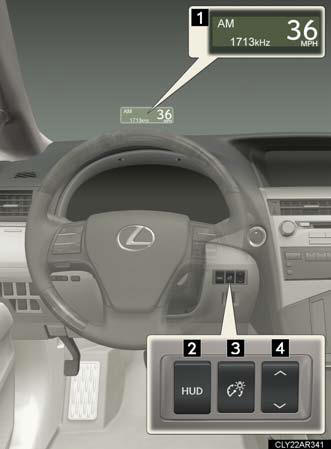
1. Head-up display.
Display brightness will change automatically according to the brightness of the surrounding area.
2. Head-up display main switch.
3. Display contrast adjustment switch.
Display brightness can be adjusted to the desired level..
4. Display position adjustment switch.
Head-up display contents
In addition to vehicle speed, the following information will be displayed:
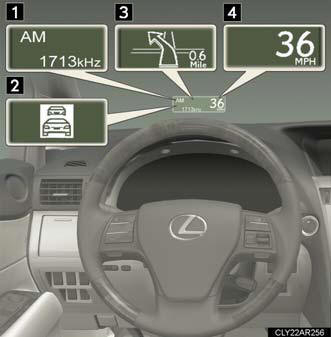
1. Audio display.
Displays audio information for approximately 3 seconds when the audio system is operated.
2. Dynamic radar cruise control (if equipped).
Displays the approach warning message.
3. Turn-by-turn navigation*.
Displays a notification of upcoming intersections during navigation system route guidance.
4. Vehicle speed display.
*: Refer to “Navigation System Owner’s Manual”.
Head-up display main switch
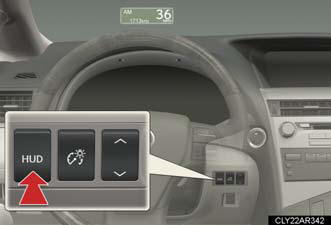
Pressing the button turns the
head-up display on/off and
changes the vehicle speed display
units as follows:
- Vehicles sold in the U.S.A.
OFF → ON (mph) → ON (km/h) → OFF.
- Except vehicles sold in the U.S.A.
OFF → ON (km/h) → ON (mph) → OFF.
Display adjustment
- Adjusting display contrast
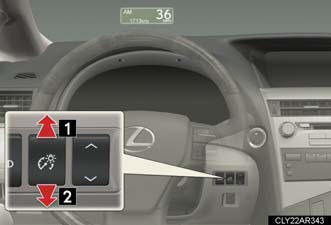
1. Brighter.
2. Darker.
- Adjusting display position
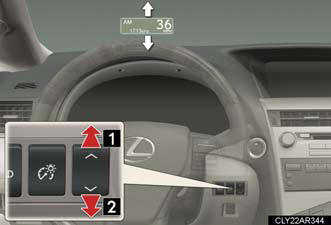
1. Higher.
2. Lower.
Display customization
The audio mode display can be shown or hidden.
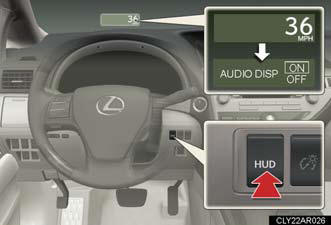
Pressing and holding the head-up display main switch button for more than 2 seconds changes the display to audio display on/off mode. Press the head-up display main switch button to turn the audio display on/off.
Customization can be performed when the head-up display is on and the vehicle is traveling at less than 5 mph (8 km/h).
Brightness of the head-up display
The headlight control sensor detects the brightness of the area surrounding
the
head-up display and adjusts the brightness accordingly.
Head-up display
The head-up display may seem dark and hard to see when viewed through
sunglasses,
especially polarized sunglasses.
Adjust the brightness of the head-up display or remove your sunglasses.
CAUTION:
Before using the head-up display
Check that the position and brightness of the head-up display image does not
interfere
with safe driving. Incorrect adjustment of the image's position or brightness
may obstruct the driver's view and lead to an accident, resulting in death or
serious
injury.
NOTICE:
To prevent damage to components
Do not place anything on the head-up display opening.
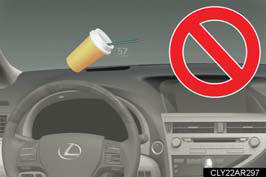
If an object falls into the opening of the head-up display, remove it immediately.
Also, avoid spilling water or other liquids near the head-up display opening as this may cause mechanical damage.
See also:
Operating a Bluetooth® enabled portable player
Selecting an album
To select the desired album, press
or .
Selecting tracks
Press or
on
to select the desired track.
Playing and pausing tracks
To play or pause a track, press (
).
Fa ...
General maintenance
Listed below are the general maintenance items that should be performed
at the intervals specified in the “Warranty and Service Guide” or “Owner’s
Manual Supplement”. It is recommended that any prob ...
Interior
The GX's interior looked and felt great with its comfy, heated leather seats
and gorgeous wood trim, but it fell short when it came to usable space and
practical features.
If you're a smoker, th ...