
Electronic key battery
Replace the battery with a new one if it is discharged.
You will need the following items:
Flathead screwdriver.
- Small Phillips-head screwdriver.
- Lithium battery (CR1632).
Replacing the battery
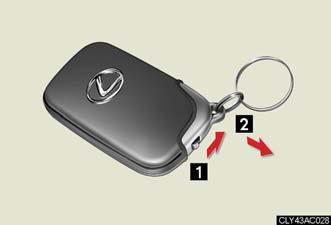
Take out the mechanical key.
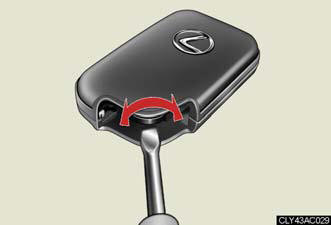
Remove the cover.
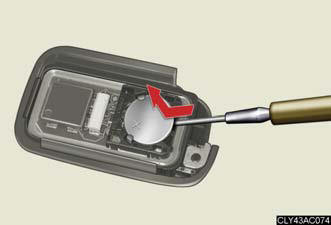
Remove the depleted battery.
Insert a new battery with the + terminal facing up.
If the electronic key battery is discharged
The following symptoms may occur.
- The smart access system with push-button start and wireless remote control
will
not function properly.
- The operational range is reduced.
Use a CR1632 lithium battery
l Batteries can be purchased at your Lexus dealer, jewelers, or camera stores.
- Replace only with the same or equivalent type recommended by a Lexus dealer.
- Dispose of used batteries according to the local laws.
CAUTION:
Removed battery and other parts
Keep away from children.
These parts are small and if swallowed by a child they can cause choking.
NOTICE:
For normal operation after replacing the battery
Observe the following precautions to prevent accidents.
- Always work with dry hands.
Moisture may cause the battery to rust.
- Do not touch or move any other components inside the remote control.
- Do not bend either of the battery terminals.
See also:
Performance
Every good mark the RX line up earns in other areas is discredited by the
hybrid's performance attributes. To get such excellent mileage, the V-6 engine
is teamed with an electric motor and a larg ...
Seat heaters and ventilators
The seat heaters and ventilators heat the seats and maintain good airflow
by blowing air from the seats.
1. Heats the seats.
The indicator light (orange)
comes on.
The higher the number, the
w ...
And the inside?
Like the exterior, the ES’ interior makes neither friends nor enemies. It’s
business as usual for Lexus, which means you’ll be treated to acres of glossy
wood, sumptuous leather and a generally co ...