
Operating a Bluetooth® enabled portable player
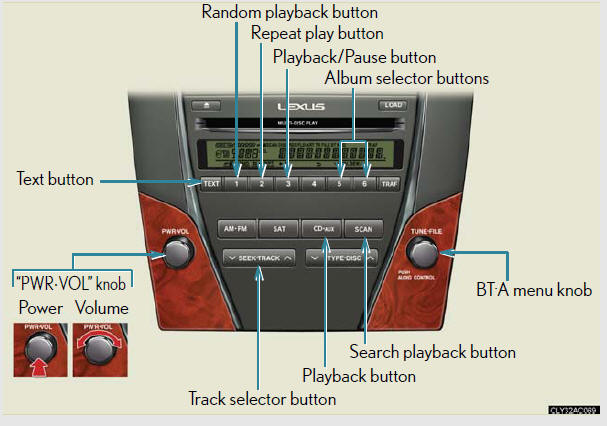
Selecting an album
To select the desired album, press


or 
 .
.
Selecting tracks
Press or
on
 to select the desired track.
Playing and pausing tracks
To play or pause a track, press  (
(
 ).
).
Fast-forwarding and rewinding tracks
To fast-forward or rewind, press and hold
or
on
until you hear a beep.
Random playback
Press  (RAND).
To cancel, press  (RAND) again.
Repeat play
Press  (RPT).
To cancel, press  (RPT) again.
Scanning tracks
Press  .
.
To cancel, press  again.
Switching the display
Press  .
.
Each time the button is pressed, the display changes in the following order:
Elapsed time → Album title → Track title → Artist name
Bluetooth® audio system functions
Depending on the portable player that is connected to the system, certain
functions
may not be available.
Error message
“Memory Error”: This indicates a problem in the system.
See also:
Sun visors
1. Forward position:
Flip down.
2. Side position:
Flip down, unhook, and swing
to the side.
3. Side extender:
Place in side position, then
slide backwards. ...
Using the CD player
- Type A
- Type B
- Type C
Loading a CD
Loading a CD
1. Press .
“WAIT” is shown on the display.
2. When the indicator on the slot turns from amber to green, insert a
CD.
The display cha ...
Safety
There were plenty of safety features in the Lexus GX, but they weren't
exactly cutting-edge. Newer safety features like a blind spot warning system and
a radar-based collision preparation system h ...