
Using the steering wheel audio switches
Some audio features can be controlled using the switches on the steering wheel.
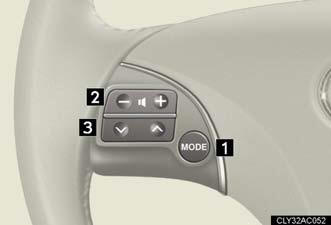
1. Turns the power on, selects an audio source.
2. Increases/decreases volume.
3. Radio mode: Selects a radio station.
CD mode: Selects a track,
file (MP3 and
WMA) and disc.
Bluetooth® audio mode:
Selects a track and
album.
iPod® mode (if equipped): Selects a song.
USB memory mode (if
equipped):
Selects a file and folder.
Turning on the power
Press  when the audio system is
turned OFF.
The audio system can be turned off by holding the button down for 1 second or more.
Changing the audio source
Press when the audio system is
turned ON. The audio source
changes as follows each time the switch is pressed. If no discs are inserted
in the player, that mode will be skipped.
FM1→FM2→SAT1∗→SAT2∗→SAT3∗→CD player→ Bluetooth® audio→AUX→iPod®∗ or USB memory∗→AM→FM1
Adjusting the volume
Press “+” on  to increase the
volume and “-” to decrease the volume.
Hold down the switch to continue increasing or decreasing the volume.
Selecting a radio station
1. Press to select the radio
mode.
2. Press  or
or
 on
to select a radio station.
on
to select a radio station.
To scan for receivable stations, press and hold
or
on the switch
until you hear a beep.
Selecting a track/file
1. Press to select CD,
Bluetooth® audio, iPod® (if equipped)
or USB memory (if equipped) mode.
2. Press or
on
to select the desired track/file or
song.
Selecting an album
1. Press to select Bluetooth®
audio mode.
2. Press and hold or
on
until you hear a beep.
Selecting a folder (if equipped)
Press to select USB memory mode.
Press and hold or
on
until you hear a beep.
Selecting a disc in the CD player
Press to select the CD mode.
Press and hold or
on
switch until you hear a beep.
Canceling automatic selection of a radio station
Press again.
CAUTION:
To reduce the risk of an accident
Exercise care when operating the audio switches on the steering wheel.
See also:
SRS airbags
The SRS airbags inflate when the vehicle is subjected to certain types of
severe impacts that may cause significant injury to the occupants. They
work together with the seat belts to help reduce the ...
2009 Lexus GX 470 review
Maybe I'm spoiled, but I like nice things. I especially like nice cars with
rich leather seats, premium sound systems, powerful engines and super-cool
features. These are some of the things that m ...
Engine/Transmission/Drivetrain/Performance
The IS 250's 2.5-liter V6 engine delivers 204 horsepower at 6,400 RPM and 185
lb.-ft. of peak torque at 4,800 rpm. The Lexus IS 350's 3.5-liter V6 offers a
more potent 306 horsepower at 6,400 RPM ...