
Correct driving posture
Drive in a good posture as follows:
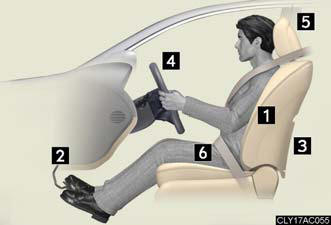
1. Sit upright and well back in the seat.
2. Adjust the position of the seat
forward or backward to
ensure the pedals can be
reached and easily
depressed to the extent
required.
3. Adjust the seatback so that the controls are easily operable.
4. Adjust the tilt and telescopic positions of the steering wheel downward so the airbag is facing your chest.
5. Lock the head restraint in place with the center of the head restraint closest to the top of your ears.
6. Wear the seat belt correctly.
CAUTION:
While driving
- Do not adjust the position of the driver’s seat while driving.
Doing so could cause the driver to lose control of the vehicle.
- Do not place a cushion between the driver or passenger and the seatback.
A cushion may prevent correct posture from being achieved, and reduce the
effectiveness of the seat belt and head restraint, increasing the risk of death
or
serious injury to the driver or passenger.
- Do not place anything under the front seats.
Objects placed under the front seats may become jammed in the seat tracks and
stop the seat from locking in place. This may lead to an accident. The
adjustment
mechanism may also be damaged.
Adjusting the seat position: - Take care when adjusting the seat position to ensure that other passengers are not injured by the moving seat.
- Do not put your hands under the seat or near the moving parts to avoid injury.
Fingers or hands may become jammed in the seat mechanism.
See also:
Luxury/Comfort/Convenience
Already lauded for its comprehensive luxury, the Lexus LS 460 gains numerous
additional user-tech amenities for 2010. The driver's seat now features a
standard slide-away feature that makes ingres ...
2010 Lexus GX 460
When the Lexus GX 460 showed up in my driveway, I almost discounted it
immediately. It seemed like another honkin' big SUV that requires honkin' deep
pockets to purchase; my test vehicle was price ...
Interior lights list
1. Front personal lights.
2. Front interior lights.
3. Shift lever light (when the “POWER” switch is in ACCESSORY or
ON mode).
4. Rear personal lights.
5. Rear interior light.
6. Door courtesy ...