
Clock
 Without navigation system
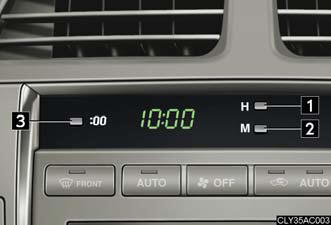
1. Adjusts the hour.
2. Adjusts the minutes.
3. Rounds to the nearest hour.* *: e.g. 1:00 to 1:29 → 1:00 1:30 to 1:59 → 2:00
With navigation system
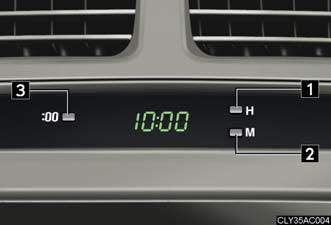
1. Adjusts the hour.
2. Adjusts the minutes.
3. Rounds to the nearest hour.* *: e.g. 1:00 to 1:29 → 1:00 1:30 to 1:59 → 2:00
The clock is displayed when
The “ENGINE START STOP” switch is in ACCESSORY or IGNITION ON mode.
See also:
EXTERIOR
The 2011 RX 350 says luxury without being ostentatious and offers soft lines
and curves that create a perfectly well-rounded facade. From the outside, it's
easy to see why so many people drive thi ...
Theft prevention labels (for USA)
These labels are attached to the
vehicle to reduce vehicle theft
by facilitating the tracing and
recovery of parts from stolen
vehicles. Do not remove under
penalty of law. ...
Side doors
The vehicle can be locked and unlocked using the entry function, wireless
remote control or door lock switches.
Door lock switches
1. Locks all the doors.
2. Unlocks all the doors.
Inside lock ...