
Auxiliary box
Auxiliary box
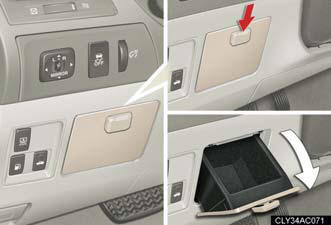
To open, press down the knob.
CAUTION:
Caution while driving
Keep the auxiliary box closed.
In the event of sudden braking, personal injury may result from contact due to movement of the open auxiliary box or items that may come out of the auxiliary box.
See also:
Handling, Braking & Ride Quality
If the CT stumbles in acceleration, it shines in handling. The steering wheel
turns with a light touch at low speeds in Eco and Normal mode, but it wanders
too much on the highway. Sport mode dial ...
Seat position memory (front passenger’s seat)
Your preferred front passenger seat position can be memorized and recalled with the touch of a button.
Two different seat positions can be entered into memory.
Entering a position to memory ...
Bluetooth® audio system setup
System setup items and operation procedures
- Pattern A.
To enter the menu for each function, follow the steps below using a
voice command or :
- Pattern B.
1. Press to select “BT•A MENU”.
2. Se ...