
Turn signal lever
The turn signal lever can be used to show the following intention of the driver:
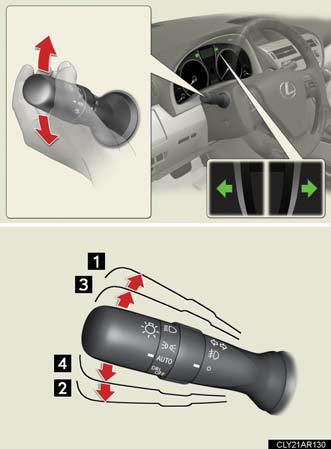
1. Right turn.
2. Left turn.
3. Lane change to the right (push and hold the lever partway).
The right hand signals will flash until you release the lever.
4. Lane change to the left (push and hold the lever partway).
The left hand signals will flash until you release the lever.
Turn signals can be operated when
The “POWER” switch is in ON mode.
If the indicators flash faster than usual
Check that a light bulb in the front or rear turn signal lights has not burned out.
See also:
Exterior
The new RX is clearly an evolution of the past generation's design, not a
groundbreaking new look. That's OK, because the previous generation is the
benchmark for the class; competing automakers t ...
Multi-information display
The multi-information display presents the driver with a variety of
drivingrelated
data, including the current outside air temperature.
Trip information.
Displays driving range, fuel consumptio ...
Using the phone book
To enter the menu for each function, follow the steps below using a
voice command or :
Adding a new phone number
1. “Phonebook” → 2. “Add Entry”.
Changing the registered name in the phone bo ...