
Steering wheel
The steering wheel can be adjusted to a comfortable position.
Operating the switch moves the steering wheel in the following directions:
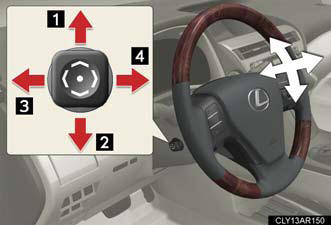
1. Up.
2. Down.
3. Away from the driver.
4. Toward the driver.
Auto tilt away
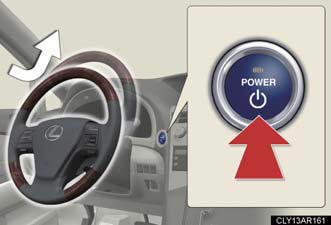
When the “POWER” switch is turned off, the steering wheel returns to its stowed position by moving up and away to enable easier driver entry and exit.
Turning the “POWER” switch to ACCESSORY or ON mode will return the steering wheel to the original position.
The steering wheel can be adjusted when
The “POWER” switch is in ACCESSORY or ON mode*.
*: Vehicles with driving position memory: If the driver's seat belt is fastened,
the
steering wheel can be adjusted regardless of “POWER” switch mode.
Automatic adjustment of the steering position (vehicles with driving
position
memory)
A desired steering position can be entered to memory and recalled
automatically
by the driving position memory.
Notes for the auto tilt away function (vehicles with driving position memory)
The auto tilt away function can only operate when the “POWER” switch has been
turned off, the driver seat belt has been unfastened and the driver’s seat
movement
is in a setting other than off.
When the driver fastens the seat belt again, the steering wheel will return to
the
original position.
CAUTION:
Caution while driving
Do not adjust the steering wheel while driving.
Doing so may cause the driver to mishandle the vehicle and cause an accident, resulting in death or serious injury.
See also:
Sun visors
1. Forward position:
Flip down.
2. Side position:
Flip down, unhook, and swing
to the side.
3. Side extender:
Place in side position, then
slide backwards. ...
Overview
Lexus has introduced an all-new, second-generation Lexus GX 460 luxury
utility vehicle for 2010 that is more powerful, more efficient, quieter and more
luxurious than the Lexus GX 470 model it rep ...
Seat position memory (front passenger’s seat)
Your preferred front passenger seat position can be memorized and recalled with the touch of a button.
Two different seat positions can be entered into memory.
Entering a position to memory ...