
Floor mat
Use only floor mats designed specifically for vehicles of the same model and model year as your vehicle. Fix them securely in place onto the carpet.
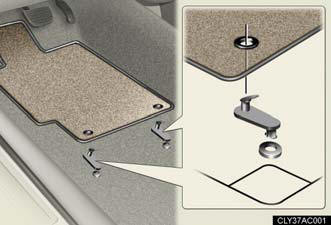
Fix the floor mat in place using the retaining hooks (clips) provided.
For details, refer to the floor mat retention clip installation instructions supplied with the clips.
CAUTION:
Observe the following precautions.
Failure to do so may cause the driver's floor mat to slip, possibly interfering
with the
pedals while driving. An unexpectedly high speed may result or it may become
difficult
to stop the vehicle, leading to a serious accident.
When installing the driver's floor mat
- Do not use floor mats designed for other models or different model year
vehicles,
even if they are Lexus Genuine floor mats.
- Only use floor mats designed for the driver's seat.
- Always install the floor mat securely using the retaining hooks (clips) provided.
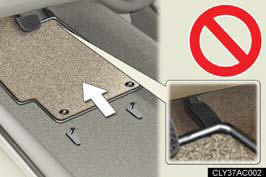
- Do not use two or more floor mats on top of each other.
- Do not place the floor mat bottom-side up or upside-down.
CAUTION:
Before driving
- Check that the floor mat is securely fixed in the right place with all the
provided
retaining hooks (clips). Be especially careful to perform this check after
cleaning
the floor.
- With the engine stopped and the shift lever in P, fully depress each pedal to
the
floor to make sure it does not interfere with the floor mat.
See also:
Bluetooth® audio system setup
System setup items and operation procedures
- Pattern A.
To enter the menu for each function, follow the steps below using a
voice command or :
- Pattern B.
1. Press to select “BT•A MENU”.
2. Se ...
If you lose your keys
New genuine Lexus keys can be made by your Lexus dealer using the other
key and the key number stamped on your key number plate. ...
Luxury Options
Lexus makes personalizing the Lexus GX 460 easy for 2010 by offering a
Convenience Package and a Comfort Plus Package, as well as making many of the
packages' features available as stand-alone opt ...