
Clock
 Without navigation system
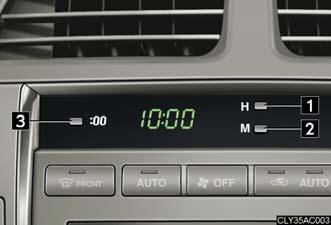
1. Adjusts the hour.
2. Adjusts the minutes.
3. Rounds to the nearest hour.* *: e.g. 1:00 to 1:29 → 1:00 1:30 to 1:59 → 2:00
With navigation system
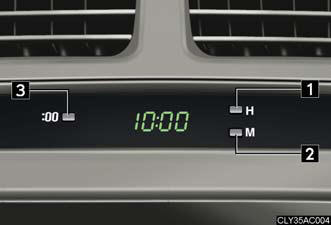
1. Adjusts the hour.
2. Adjusts the minutes.
3. Rounds to the nearest hour.* *: e.g. 1:00 to 1:29 → 1:00 1:30 to 1:59 → 2:00
The clock is displayed when
The “ENGINE START STOP” switch is in ACCESSORY or IGNITION ON mode.
See also:
Operating a Bluetooth® enabled portable player
- Type A
- Type B
Selecting an album
To select the desired album, press
or
.
Selecting tracks
Press or
on
to select the desired track.
Playing and pausing tracks
To play or pause a tr ...
Crawl Control and Downhill Assist Control
In addition to KDSS, the 2010 Lexus GX 460 offers optional Crawl Control a
new technology that helps make driving off-road easier. The Crawl Control
feature automatically modulates the throttle an ...
Using the Bluetooth® audio system
Audio unit
1. Display.
A message, name, number,
etc. is displayed.
Lower-case characters and
special characters cannot be
displayed.
2. Displays information that is
too long to be displayed ...