
Auxiliary box
Auxiliary box
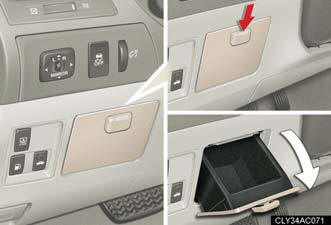
To open, press down the knob.
CAUTION:
Caution while driving
Keep the auxiliary box closed.
In the event of sudden braking, personal injury may result from contact due to movement of the open auxiliary box or items that may come out of the auxiliary box.
See also:
Engine immobilizer system
The vehicle's keys have built-in transponder chips that prevent the engine
from starting if the key has not been previously registered in the vehicle's
on-board computer.
Never leave the keys insid ...
Ashtray
Push the back part of the lid to
open.
To remove, pull the ashtray
upwards.
CAUTION:
When not in use
Keep the ashtray closed.
Injuries may result in the event of sudden braking, sudden swervi ...
Interior
Seating for five people is standard, but the GX 470 can seat up to eight
occupants when equipped with an optional third-row seat. Standard features
include dual-zone automatic climate control, lea ...