
Using the AUX adapter
This adapter can be used to connect a portable audio device and listen to
it
through the vehicle’s speakers.
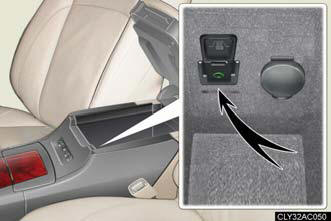
Connect the portable audio device.
Press  .
.
Operating portable audio devices connected to the audio system
The volume can be adjusted using the vehicle's audio controls. All other
adjustments
must be made on the portable audio device itself.
When using a portable audio device connected to the power outlet
Noise may occur during playback. Use the power source of the portable audio device.
See also:
Opening the fuel tank cap
The fuel tank of your vehicle has a special structure, which requires a
reduction in fuel tank pressure before refueling. After the opener switch
has been pressed, it will take several seconds until ...
Intuitive parking assist
The distance to obstacles measured by the sensors is communicated via
the multi-information display and a buzzer when parallel parking or
maneuvering into a garage is conducted. Always check the sur ...
Rear View Monitor
A back monitor is also available, automatically projecting a full colour,
camera fed image of the view behind the vehicle onto the Lexus CT 200h's
navigation system display or the 3.3" displa ...