
Doors
The vehicle can be locked and unlocked using the entry function, wireless remote control or door lock switch.
Door lock switch
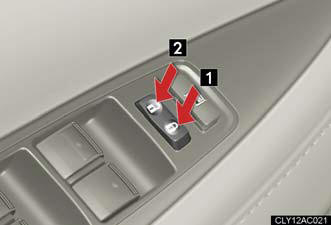
1. Locks all doors.
2. Unlocks all doors.
Inside lock button
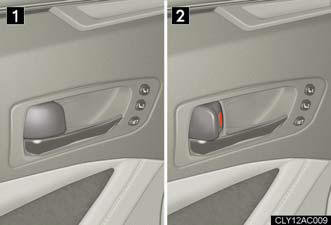
1. Locks the door.
2. Unlocks the door.
The front doors can be opened by pulling the inside handle even if the lock buttons are in the lock position.
Locking the front doors from the outside without a key
The door cannot be locked if the “ENGINE START STOP” switch is in ACCESSORY or IGNITION ON mode, or the electronic key is left inside the vehicle.
Depending on the position of the electronic key, the key may not be detected correctly and the door may be locked.
Rear door child-protector lock
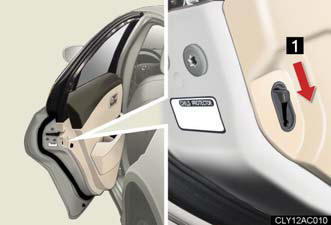
1. The door cannot be opened from inside the vehicle when the locks are set.
These locks can be set to prevent children from opening the rear doors. Push down on each rear door switch to lock both rear doors.
Automatic door locking and unlocking systems
The following functions can be set or cancelled:
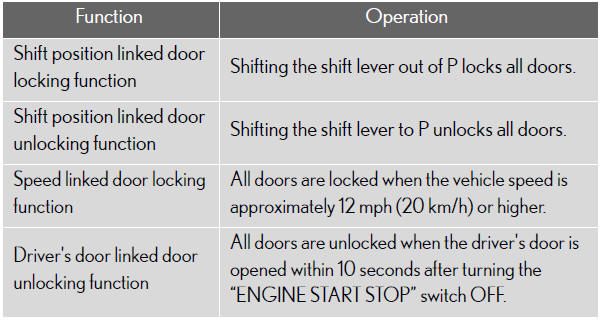
Setting and canceling the functions (vehicles without a navigation system only)
To switch between setting and canceling, follow the procedure below: Close all the doors and switch the “ENGINE START STOP” switch to IGNITION ON mode. (Perform the step 2 within 10 seconds.)
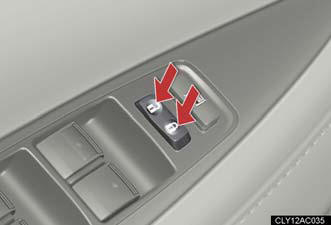
Shift the shift lever to P or N, and
press and hold the driver's door
lock switch ( ) for
) for
approximately 5 seconds and then
release.
The shift lever and switch positions corresponding to the desired function to be set are shown as follows.
Use the same procedure to cancel the function.
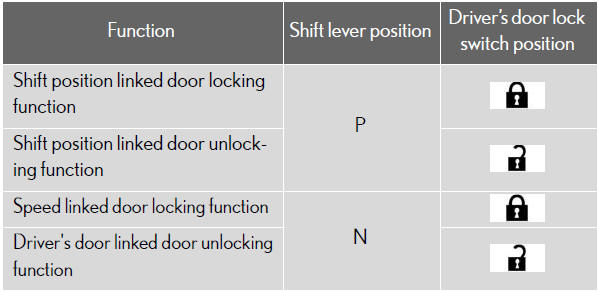
When the setting or canceling operation is complete, all doors are locked and then unlocked.
Impact detection door lock release system
In the event that the vehicle is subject to a strong impact, all the doors are unlocked.
Depending on the force of the impact or the type of accident, however, the
system
may not operate.
Using the mechanical key
The doors can also be locked and unlocked with the mechanical key.
Customization that can be configured at Lexus dealer
Settings (e.g. unlocking function using a key) can be changed.
CAUTION:
To prevent an accident
Observe the following precautions while driving the vehicle.
Failing to do so may result in a door opening and an occupant falling out,
resulting in
death or serious injury.
- Always use a seat belt.
- Always lock all doors.
- Ensure that all doors are properly closed.
- Do not pull the inside handle of the doors while driving.
The doors may be opened and the passengers are thrown out of the vehicle and it may result in serious injury or death.
Be especially careful for the front doors, the doors may be opened even if the inside lock buttons are in locked position.
- Set the rear door child protector locks when children are seated in the rear seat.
See also:
What’s it up against?
This one’s tough to answer: The ES doesn’t really have many direct rivals
aside from the Ford Fusion-based Lincoln MKZ, the Cadillac CTS , the Acura TL
and the Volvo S80 since the segment is all-b ...
Safety/Security Features
The Adaptive Front-lighting System (AFS), standard on the Lexus GS 460 and
optional for the GS 350, helps illuminate a curve as the driver steers into it.
A Tire Pressure Monitoring system can det ...
Headlight cleaner switch
Washer fluid can be sprayed on the headlights.
Press the switch to clean the
headlights.
The headlight cleaner can be operated when
The “POWER” switch is in ON mode and the headlight switch is t ...