
Clock
The clock is displayed when the “POWER” switch is in ACCESSORY or ON mode. Perform the following steps to adjust the clock.
- Without a navigation system
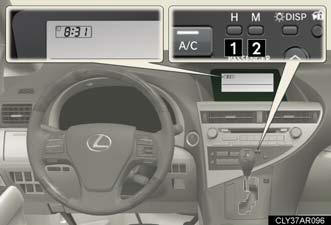
1. Adjusts the hours.
2. Adjusts the minutes.
- With a navigation system Refer to “Navigation System Owner’s Manual”.
The time display will automatically be set to 1:00.
See also:
Headlight aim
Vertical movement adjusting bolts
- Vehicles with discharge headlights
1. Adjustment bolt A.
2. Adjustment bolt B.
- Vehicles with LED headlights
1. Adjustment bolt A.
2. Adjustment bolt B.
...
Most Recent Lexus RX 330
Available from 2004 through 2006, the Lexus RX 330 brought more power, more
room, more luxury features and more aggressive styling to Lexus' popular midsize
luxury SUV.
Still loosely based on th ...
Performance
Even if you like the looks inside and out — which many likely will — there is
nothing endearing about the driving experience.
First there's the body-lean issue. When you take a highway off-ramp at ...