
Cup holders
- Front (type A)
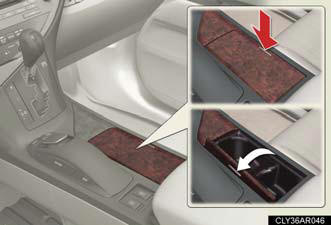
Press down and release the right side of the cup holder lid.
- Front (type B)
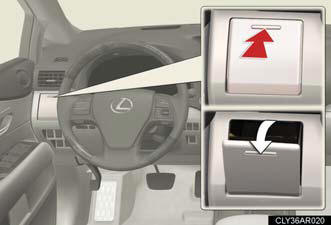
Press in and release the cup holder.
- Rear
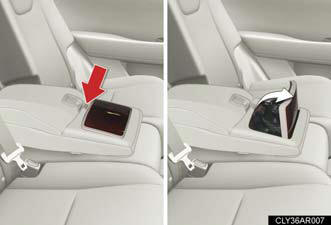
Press down the button on the armrest.
Cup holder insert
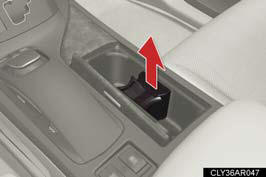
The cup holder insert may be removed for cleaning.
CAUTION:
Items unsuitable for the cup holder Do not place anything other than cups or beverage cans in the cup holders. Even when the lid is closed, items must not be stored in the cup holders.
Other items may be thrown out of the holders in the event of an accident or sudden
braking and cause injury. If possible, cover hot drinks to prevent burns.
To prevent burns
Put a lid on containers with hot liquids inside.
When not in use
Keep the cup holders closed.
Injuries may result in the event of an accident or sudden braking.
See also:
Performance
Review-OnRoad You need to work the 2.5-litre V6 petrol engine hard to extract
maximum performance, but it pulls cleanly from low revs and is punchy enough for
assured overtaking. Similarly, the di ...
Cargo and luggage
Take notice of the following information about storage precautions, cargo
capacity and load.
l Stow cargo and luggage in the luggage compartment whenever
possible.
Be sure all items are secured in ...
Current Lexus IS 250
Lexus sells the IS 250 in a single trim level, with either rear-wheel drive
or all-wheel drive. For power, the 250 comes with a 2.5-liter V6 rated for 204
horsepower and 185 pound-feet of torque. ...