
Using the hands-free system (for mobile phones)
Audio unit
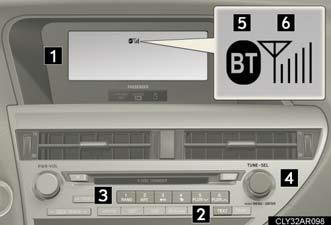
1. Display.
A message, name, phone
number, etc. is displayed.
Lower-case characters and special characters cannot be displayed.
2. Displays information that is too long to be displayed at one time on the display (press and hold).
3. Selects speed dials.
4. Selects items such as menu and number.
Turn: Selects an item.
Press: Inputs the selected item.
5. Bluetooth® connection condition.
If “BT” is not displayed, the
hands-free phone system
cannot be used.
6. Reception level.
Steering wheel switches
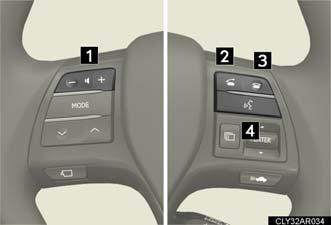
1. Volume.
During an incoming call: Adjusts the ring tone volume.
During an ongoing call:
Adjusts the receiver volume.
The voice guidance volume cannot be adjusted using this button.
2. Off-hook switch.
Turns the hands-free system on/starts a call.
3. On-hook switch.
Turns the hands-free system off/ends a call/refuses a call.
4. Talk switch.
Turns the voice command
system on (press)/turns the
voice command system off
(press and hold).
Microphone
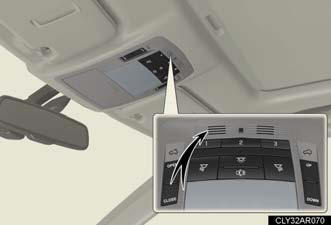
Operating the system using voice commands
By following voice guidance instructions output from the speaker, voice
commands enable the operation of the hands-free phone system without
the need to check the display or operate
 .
.
Operation procedure when using voice commands
Press the talk switch and follow voice guidance instructions.
Auxiliary commands when using voice commands
The following auxiliary commands can be used when operating the system using a voice command: “Cancel”: Exits the hands-free phone system.
“Repeat”: Repeats the previous voice guidance instruction.
“Go back”: Returns to the previous procedure.
“Help”: Reads aloud the function summary if a help comment is registered for the selected function.
Using the hands-free phone system for the first time
Before using the hands-free phone system, it is necessary to register a mobile phone in the system. The system will enter phone registration mode automatically when starting the system with no mobile phone registered.
Follow the procedure below to register (pair) a mobile phone: 1. Press the off-hook switch or the talk switch.
The introductory guidance and phone name registration instructions are heard.
2. Select “Pair Phone” using a voice command or
.
3. Register a phone name by either of the following methods:
a. Select “Record Name” using , and
say the name to be
registered.
b. Press the talk switch and say the name to be registered.
A voice guidance instruction to confirm the input is heard.
4. Select “Confirm” using a voice command or
.
A passkey is displayed and heard, and a voice guidance instruction for
inputting the passkey into the mobile phone is heard.
5. Input the passkey into the mobile phone.
Refer to the manual that comes with the mobile phone for the operation of the phone.
Guidance for registration completion is heard.
If the mobile phone has a Bluetooth® audio player, the audio player can be registered at the same time. A voice guidance instruction to register a Bluetooth® audio player is heard.
6. Select “Yes” or “No” using a voice command or
.
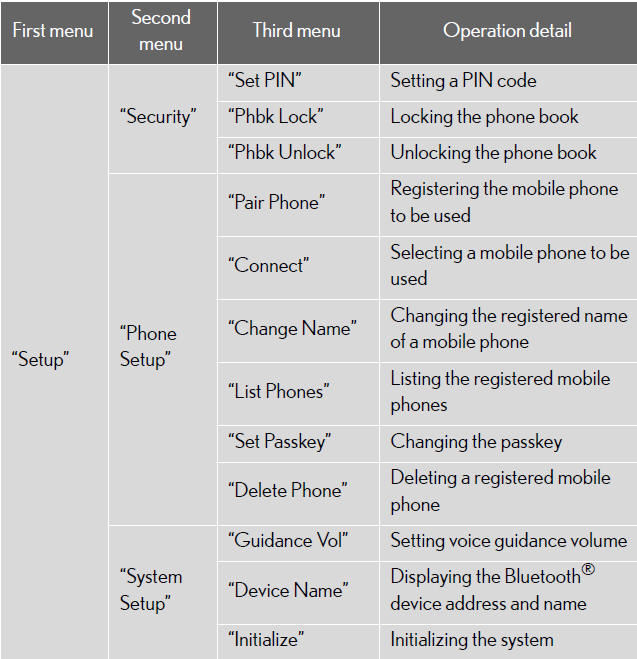
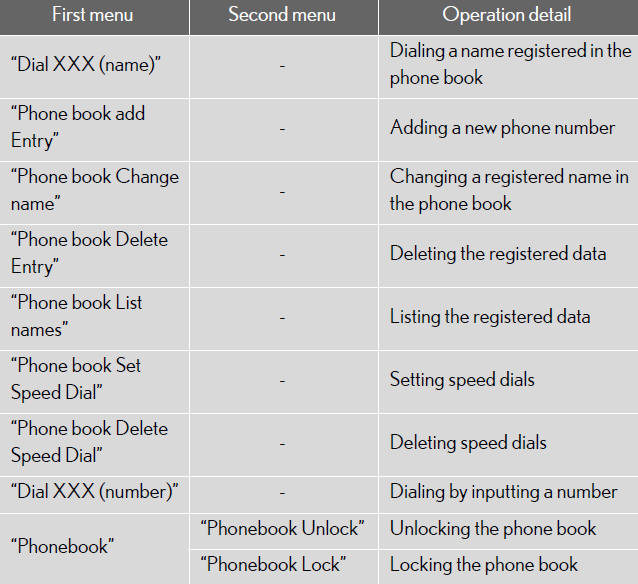
Menu list of the hands-free phone system
Normal operation
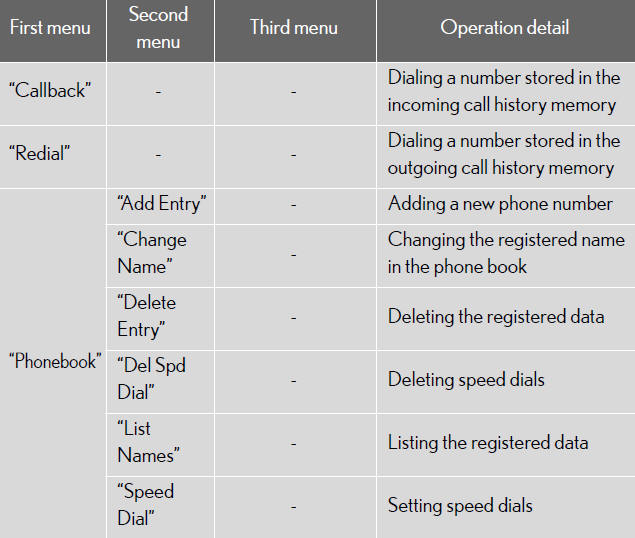
Short cut key operation
Automatic volume adjustment
When vehicle speed reaches 50 mph (80 km/h) or more, the volume automatically increases. The volume returns to the previous volume setting when vehicle speed drops to 43 mph (70 km/h) or less.
When using a voice command
For numbers, say a combination of single digits from zero to nine, # (pound), ∗ (star), and + (plus).
Say the command correctly and clearly.
Situations in which the system may not recognize your voice
When driving on rough roads.
When driving at high speeds.
When air is blowing out of the vents onto the microphone.
When the air conditioning fan emits a loud noise.
Operations that cannot be performed while driving
Operating the system with.
Registering a mobile phone to the system.
See also:
Vehicle Details
Interior
Refinements to the interior of the 2011 ES 350 include 10-way power seats up
front. Although the ES 350 may not be the first thought when purchasing a family
vehicle, the 60/40 split-fo ...
DYNAMIC PACKAGE
The new Lexus CT 200h has been specifically developed to combine superior
handling and a rewarding driving experience with the ride comfort expected of
any Lexus.
The Lexus CT 200h benefits from ...
Emergency flashers
Use the emergency flashers if the vehicle malfunctions or is involved in
an
accident.
Press the switch to flash all the
turn signal lights. To turn them
off, press the switch once again.
NOTI ...