
Driving position memory
Your preferred driving position (the position of the driver's seat,
steering
wheel and outside rear view mirrors) can be memorized and recalled with
the touch of a button. It is also possible to set this function to activate
automatically
when the doors are unlocked.
Three different driving positions can be entered into memory.
Entering a position to memory
1. Turn the “POWER” switch to ON mode.
2. Adjust the driver’s seat, steering wheel and outside rear view mirrors to the desired positions.
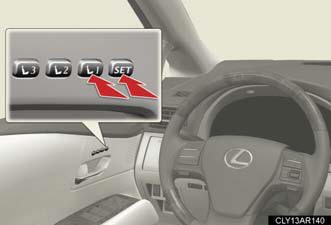
3. Press the “SET” button, then within 3 seconds press button “1”, “2” or “3” until the signal beeps.
If the selected button has already been preset, the previously recorded position will be overwritten.
Recalling the memorized position
1. Check that the shift lever is set in P.
2. Turn the “POWER” switch to ON mode.
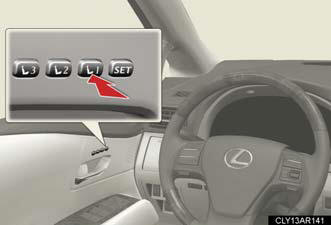
3. Press button “1”, “2” or “3” until the signal beeps to recall the desired position.
Linking driving position memory with door unlock operation
Record your driving position to button “1”, “2” or “3” before performing
the following:
Carry only the key (including the card key) to which you want to link the
driving position. If 2 or more keys are in the vehicle, the driving position
cannot be linked properly.
1. Shift the shift lever to P and close the driver's door. Turn the “POWER” switch to ON mode.
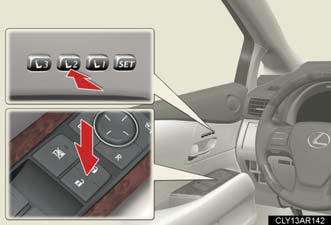
2. Press the desired button (“1”, “2” or “3”) to recall the position. Then, while keep pressing the button, press the driver's door lock switches (either lock or unlock) until the signal beeps.
The driving position is recalled when the driver's door is unlocked using the entry function or wireless remote control and the driver's door is opened.
Operating the driving position memory after turning the “POWER” switch off
Memorized positions (except for the steering wheel position) can be activated
up
to 180 seconds after the driver’s door is opened and another 60 seconds after it
is
closed again, even after turning the “POWER” switch off.
Canceling the linked door unlock operation
1. Turn the “POWER” switch to ON mode and close the driver's door.
2. While pressing the “SET” button, press the driver’s door lock switches (either lock or unlock) until the signal beeps.
Stopping seat position operation part-way through
Perform any of the following operations: Press the “SET” button.
Press button “1”, “2” or “3”.
Adjust the seat using the switches (only cancels seat position recall).
Adjust the steering wheel using the tilt and telescopic steering control
switch
(only cancels steering wheel position recall).
Correct seat position
When the seat is in the most forward or most backward position, and the seat
is
being moved in those directions, the system may not correctly recognize the
current
position and the memorized position will not be correctly recalled.
When the power easy access system is activated
If a seat position is memorized, the driver seat will move back the set
distance
from that memorized position.
CAUTION:
Seat adjustment caution
Take care during seat adjustment so that the seat does not strike the rear
passenger
or squeeze your body against the steering wheel.
See also:
Overview
The Lexus LS 460 flagship luxury sedans debut revised styling, new
electronics and a new optional performance-tuned Sport Package for 2010. Lexus
continues to offer the Lexus LS 460 and long-wheel ...
F Sport Performance Accessories
Lexus offers a selection of F Sport Performance Accessories for the IS
models, including performance-enhancing parts such as 19-inch forged alloy
wheels, brake upgrades, suspension systems, air in ...
RX 450h in the Market
I've personally never understood car shoppers' desire to get a hybrid version
of a luxury car or SUV, even if the mileage gains are significant, as they are
in the RX; these buyers can afford more ...