
Optimal use of the audio system
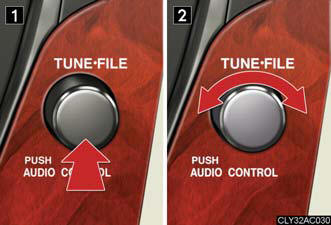
1. Displays the current mode.
2. Changes the following setting.
• Sound quality and volume balance.
The sound quality and balance setting can be changed to produce the best sound.
• Automatic Sound Levelizer ON/OFF.
Adjusting sound quality and volume balance
Changing sound quality modes
Press  .
.
Pressing the button changes sound modes in the following order:
“BAS”→“MID”→“TRE”→“FAD”→“BAL”→“ASL”.
Adjusting sound quality
Turning adjusts the level.
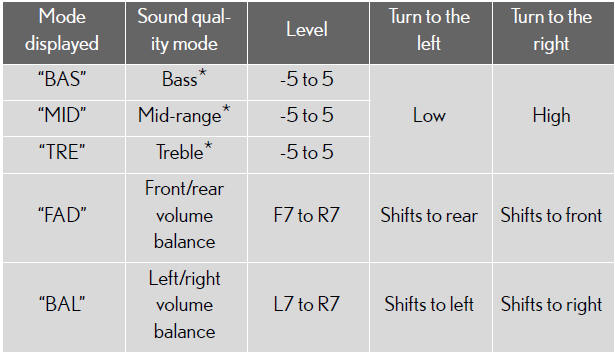
*: The sound quality level is adjusted individually in each audio mode.
Turning the Automatic Sound Levelizer (ASL) on/off
Turning clockwise turns on the
ASL, and turning counterclockwise
turns off the ASL.
ASL automatically adjusts the volume and tone quality according to the noise level as you drive your vehicle.
See also:
Turn signal lever
1. Right turn.
2. Left turn.
3. Move and hold the lever partway
to signal a lane change.
The right hand signal will flash
until you release the lever.
4. Move and hold the lever partway
to si ...
Seat heaters and ventilators
The seat heaters and ventilators heat the seats and maintain good airflow
by blowing air from the seats.
1. Heats the seats.
The indicator light (orange)
comes on.
The higher the number, the
w ...
Clock
Without navigation system
1. Adjusts the hour.
2. Adjusts the minutes.
3. Rounds to the nearest hour.*
*: e.g. 1:00 to 1:29 → 1:00
1:30 to 1:59 → 2:00
With navigation system
1. ...