
Clock
The clock is displayed when the “POWER” switch is in ACCESSORY or ON mode. Perform the following steps to adjust the clock.
- Without a navigation system
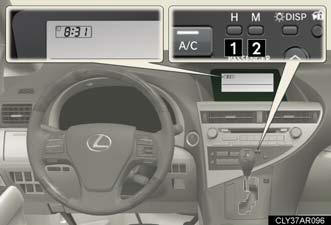
1. Adjusts the hours.
2. Adjusts the minutes.
- With a navigation system Refer to “Navigation System Owner’s Manual”.
The time display will automatically be set to 1:00.
See also:
If the vehicle battery is discharged
The following procedures may be used to start the engine if the vehicle’s
battery is discharged.
You can call your Lexus dealer or qualified repair shop.
If you have a set of jumper (or booster) ca ...
Interior lights
1. Turns the lights on/off linked to door positions.
2. Turns the lights on/off ...
Vehicle load limits
Vehicle load limits include total load capacity, seating capacity, towing
capacity and cargo capacity.
Total load capacity: 900 lb. (410 kg)
Total load capacity means the combined weight of occupan ...