
Glove box
The glove box can be opened by pressing the lock release button and locked and unlocked using the mechanical key.
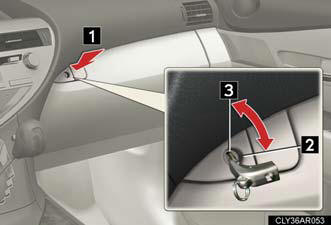
1. Opens.
2. Locks.
3. Unlocks.
Power back door main switch (if equipped)
The power back door main switch is located in the glove box.
CAUTION:
Caution while driving
Keep the glove box closed.
Injuries may result in the event of an accident or sudden braking.
See also:
Cargo
If getting to your destination isn't enjoyable, loading up the GX is even
more exasperating. To get to the cargo area, you have to open a huge swing gate.
While most SUVs have moved to a liftgate ...
Lexus Enform with Safety Connect
The Lexus GS 350 and GS 460 offer an all-new telematics system, Lexus Enform™
with Safety Connect™, available by subscription. Complimentary one-year trial
subscriptions are included on all purcha ...
Overview
There's no denying the charms of Lexus' redesigned RX crossover. It's
extremely comfortable; it packs a sophisticated, upscale interior; and, in the
hybrid version, it returns the mileage of a mid ...